

Integrations
How to connect Guesty to hostAI
Posted on Oct 21, 2026
hostAI is the AI growth platform for short-term rental brands. hostFront, the direct booking website and booking engine, runs on your own domain and stays in sync with Guesty. hostMail (guest email) and hostDistro (managed Google and ChatGPT ads) run on top of it. Connecting takes about ten minutes. hostAI asks for four values from Guesty during onboarding, and this guide shows exactly where each one lives.
Tip: keep hostAI open in one tab and Guesty in another. You will copy four things across.
Step 1: Create your hostAI account
- Go to app.gethostai.com and click Get started.
- Enter your company information.
- Select Guesty as your property management system. hostAI shows the Connect to Guesty form with four fields: Booking engine URL, Integration Token, Client Secret and Client ID.

Step 2: Connect hostAI in the Guesty Marketplace (Integration Token)
- Log in to Guesty and open the hostAI page in the Guesty Marketplace.
- Click Connect at the top right.
- Guesty shows a Guesty API Key. Copy it.
- Paste it into the Integration Token field in hostAI.

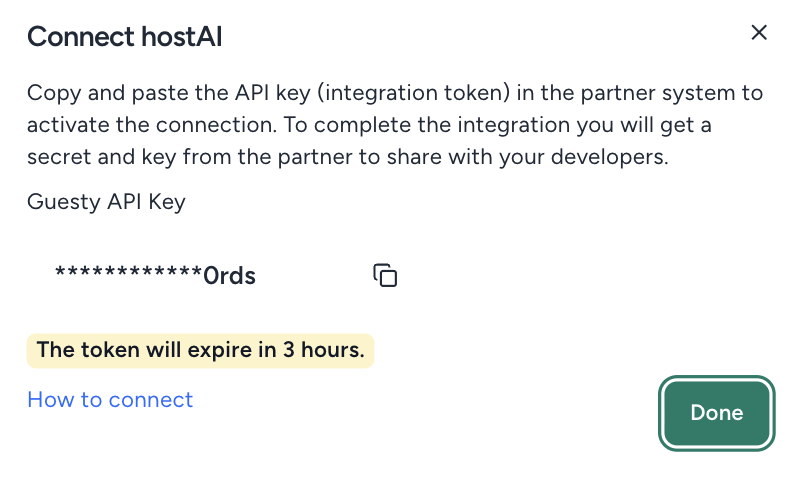
The key Guesty shows expires a few hours after it is generated, so paste it into hostAI straight away. If it has expired, click Connect again for a fresh one.
Step 3: Booking engine URL
- In Guesty, open the Booking Engine page.
- Copy the first URL shown on the page. It looks like yourbrand.guestybookings.com.
- Paste it into the Booking engine URL field in hostAI.
Step 4: Client Secret and Client ID (Booking Engine API key)
- In Guesty, open the Booking Engine API page.
- Click Create a new API Key.
- Set the nickname to hostAI, select Both under Booking options, and click Next.
- Choose All properties and click Save New API Key.
- Guesty shows your Client Secret and Client ID. Paste each into its matching field in hostAI.
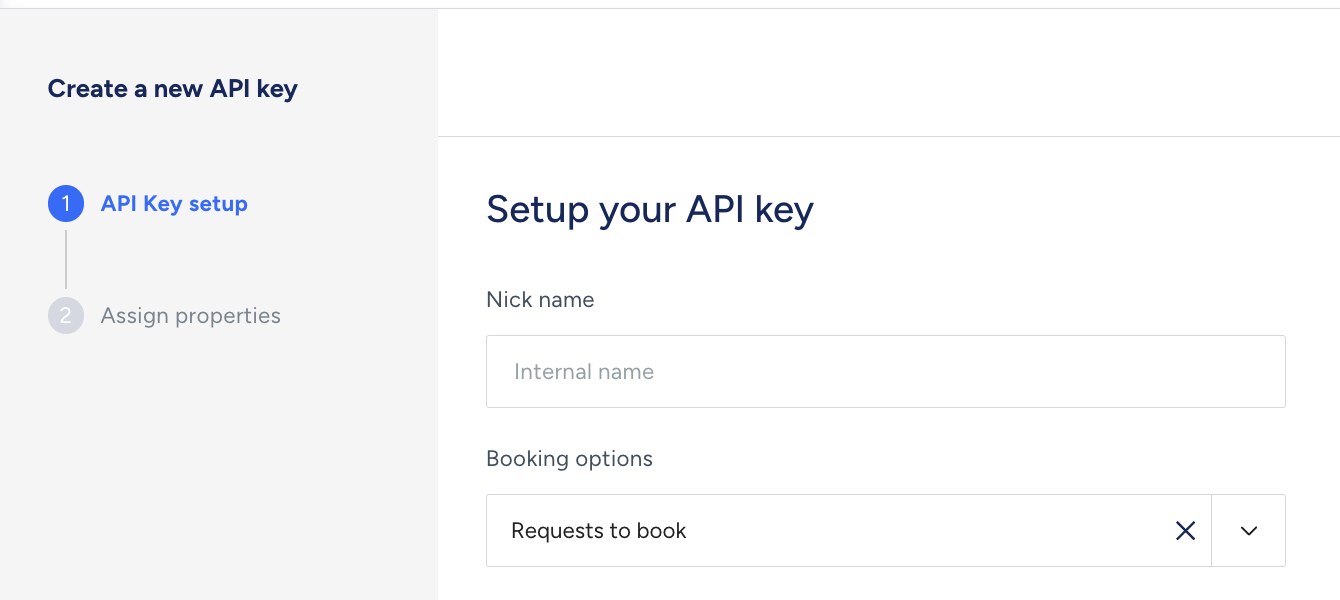
Important: Guesty shows the Client Secret only once, right after the key is created. If you navigate away before copying it, delete that key and create a new one.
Step 5: Save, and hostAI builds your site
Click Save on the Connect to Guesty step. hostAI validates the credentials and starts syncing your listings, photos, rates, availability and reservations. Your properties appear in the app as the first sync completes, and your site preview is ready in as little as 24 hours. The hostAI team reaches out to configure your domain, review the preview with you and schedule go-live.
What stays in sync
- Listings and photos: new and updated Guesty listings appear on your site automatically.
- Rates and availability: pulled from Guesty so guests always see live pricing and open dates.
- Reservations: bookings made on your hostAI site are created in Guesty, so your calendar, channels and guest messaging keep working as before.
After go-live
- Two blog posts a week are written, fact-checked and published to your site for you.
- SEO pages are generated from your inventory, and every page is structured so Google and AI assistants can read your proposition, rates and availability.
- When you are ready, add hostMail to bring past guests back direct and hostDistro to run Google and ChatGPT ads to intent-matched landing pages.
Guesty offer
Guesty customers new to hostAI get $1,000 off, applied as $250 per month for the first four months after launch. Sign up before January 1, 2027 and quote code Guesty1000 to the hostAI team during onboarding.
FAQ
Do I need to change anything in Guesty?
No. Guesty keeps running your operations. hostAI reads from it and writes direct bookings back as a channel.
Can I keep my current website?
Yes. hostFront can run on a subdomain such as book.yourbrand.com alongside your existing site, or take over your root domain. Both are reversible.
What if hostAI shows prices but the calendar does not load?
That usually means the Marketplace connection was disconnected or the key was regenerated in Guesty. Reconnect hostAI in the Guesty Marketplace and let the team know; the sync resumes within minutes.
Who do I contact for help?
Email [email protected] or use the chat on gethostai.com.